Note from Lucca Huguet
I’ve been busy building. And working. I’ve found the time to finish the website, finally!
And Yazelix Nova has also found its way to v1, a big moment for Yazelix, for sure.
So let’s talk about Nova.
Yazelix Nova is delicious to use. Persistent popups per tab let you summon
lazygit (or any program you like!), your agent CLI (I use Codex), or Ratconfig (your favorite config TUI)
with a single keystroke. The main Alt Shift H/J/K/L layer takes full advantage
of our modal-editing muscle memory.
If you use Yazelix every day, your speed will advance with it! Invest in it. It’s worth it. It has certainly done wonders for my productivity.
I’m blessed to use and improve it every day. It took a few years of experimenting with Yazelix Classic to find the correct boundaries across the Yazelix modules and healthier ways to build Yazelix. I accumulated important guidance and rules, most of which are now crystallized in Yazelix/Starcompass. And yet here we are: better than Yazelix Classic in every single way, with 75% less code and much easier maintenance.
This is just Nova v1, and v2 will be even better.
If you’d like to join the fun, try it. Open issues or discussions, criticize the project, and tell me what you love about it.
With that, I hand it to my coworker, Sol, to explain the details. If you’d like to try Nova first, start with the guide.
How Nova fits together
Written by GPT-5.6-Sol with xhigh reasoning and Lucca Huguet.
Yazelix Nova v1 gives Nix users a packaged terminal workspace built around
Mars, Yazi, and Yazelix’s Zellij and Helix forks. We call the forks Nova Zellij
and Nova Helix to distinguish them from the original Zellij and Helix projects.
The yzx command prepares the runtime and opens the workspace. Once Nova opens,
keybindings handle day-to-day work. The selected package provides the file
sidebar, work panes, popup tools, and guided tutor.
A Nix lock file or immutable nova-v* tag keeps the selected source revision
fixed. You can carry that revision to another supported machine without
assembling each integration by hand. The Mars-free package brings the managed
TUI to another capable terminal or an SSH session.
Before you start: Nova requires Nix with flakes enabled. Use
yzx enterover SSH or when you want the host terminal to retain control of graphics, clipboard behavior, and notifications.
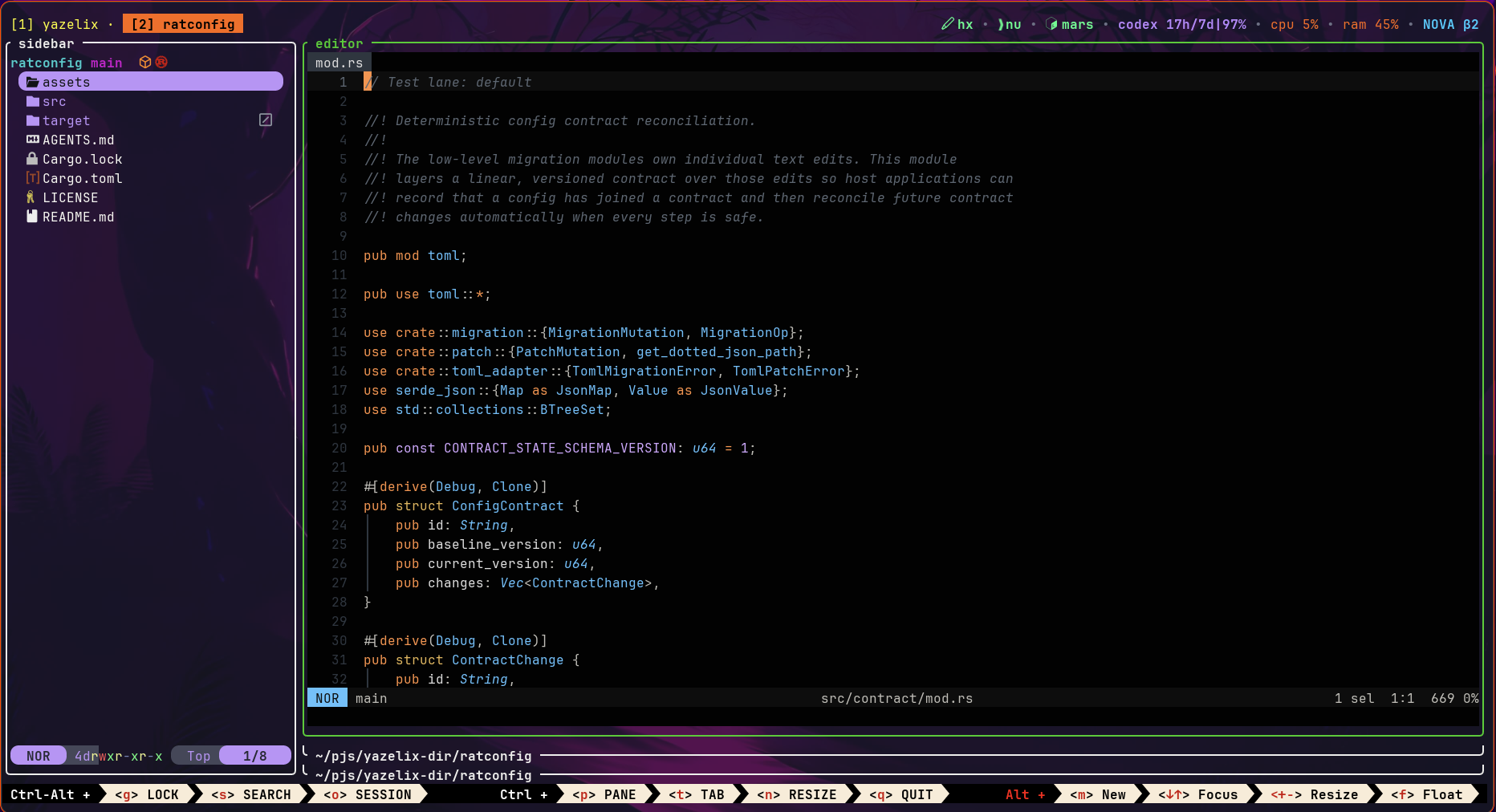
Nova v1 on Edge with Ratconfig, Mars, and Starcompass open as project tabs
Enter once, work with keys
| Command | Result |
|---|---|
yzx launch |
Opens Mars, then starts the managed Zellij workspace |
yzx enter |
Starts the same workspace in the current terminal or over SSH |
yzx config |
Opens Ratconfig from another terminal |
yzx doctor |
Checks the runtime setup without opening Mars or Zellij |
yzx tutor begin |
Starts the packaged tour |
On Linux, packages with Mars install a desktop entry. If you prefer another
terminal, set a profile to run yzx enter. Most days, you do not type another
yzx command after Nova opens. Press Alt Shift K to open Ratconfig.
The default layout keeps Yazi beside stacked work panes. Nova extends the
familiar h, j, k, and l motion grid across panes and tabs. An
Alt Shift layer opens the sidebar, Git client, configuration UI, and coding
agent. The command palette and full Yazi popup stay available from their own
keys.
| Layer | h |
j |
k |
l |
|---|---|---|---|---|
Alt |
Focus left or previous tab | Focus down | Focus up | Focus right or next tab |
Ctrl Alt |
Move tab left | Move pane down | Move pane up | Move tab right |
Alt Shift |
Yazi sidebar | Git popup | Config popup | Agent popup |
Ratconfig remaps the managed popup keys and edits the agent command and popup
margins. You can also add a custom command popup to config.toml with its own
arguments, title, keybinding, and keep-alive behavior.
Nova makes efficient use of screen space. Stacked work panes keep each task
large, and the sidebar can collapse. Tools open in near-fullscreen popups;
Alt Shift F gives one pane the full workspace. On a 13-inch laptop, the
active task gets most of the display. On a large monitor, the same layout
feels even roomier.
Mars provides the closest desktop integration. yzx enter keeps Zellij, Yazi,
the selected editor, shell setup, and Nova configuration while the host
terminal retains control of graphics, clipboard behavior, and notifications.
One owner per concern
Nova assigns each concern to one owner:
| Owner | Boundary |
|---|---|
| Nova repository | Nix package graph, yzx, root config, managed integration, and product policy |
| Mars | Desktop terminal |
| Nova Zellij | Multiplexing and the managed session surface |
| Nova Helix | Packaged editor and workspace bridge |
| Yazi | Native file-manager behavior |
| Zellij Pane Orchestrator | Tab workspace roots and pane coordination |
| Ratconfig | Terminal configuration interface |
Nova pins package outputs and leaves component implementations in their owner repositories. The maintainers removed Classic’s overlapping runtime and maintenance layers. In the fixed v1.0.0 scorecard, they counted 23,272 lines of code and configuration in Nova against 91,545 in Classic, a 75 percent reduction.
Existing Classic users can translate mutable Classic settings through the frozen migration bridge:
nix run github:Yazelix/nova/v17.12#yazelix -- launchThe bridge reads Classic settings.jsonc or config.toml files. It does not
rewrite Home Manager declarations. Users whose Classic settings match the
packaged defaults can move straight to Stable.
You see the ownership split during normal work. Yazi can open a file in the
managed Helix pane without inventing another workspace root. The pane
orchestrator keeps one root per tab, and an Alt z action can retarget that
root. Git and agent popups receive the same tab-owned path.
Sessions keep the live workspace
Plain yzx launch and yzx enter create independent sessions. Add a name when
you want a workspace you can find again:
yzx enter --session projectyzx launch --session projectAttach to a live session by its full name:
yzx enter attach projectyzx launch attach projectPackaged Zellij owns creation, attachment, switching, and process lifetime.
Attachment preserves the target’s tabs, panes, processes, working directories,
and Yazi-to-Helix routes. Ctrl Alt o, then w, opens the native session
manager inside Nova.
The agent toggle and Alt h / Alt l can stop responding after a session
switch. Press Alt 1-9 to select a tab, then retry the shortcut.
Configuration stays sparse
Nova stores semantic overrides under ~/.config/yazelix/config.toml. Missing
fields inherit packaged defaults, so an update can carry new defaults without
rewriting a large generated file. Component-owned files live under the same
~/.config/yazelix/ root when you choose to create them.
A user-owned file can stay small:
[appearance]mode = "dark"
[shell]program = "fish"
[editor]command = "nvim"
The example selects three independent overrides. Omit any field to inherit its packaged default.
yzx config presents common settings and routes native settings to their
owner’s file. The Home Manager module follows the same boundary: it installs a
selected package, writes the values you declare, and leaves other config files
absent.
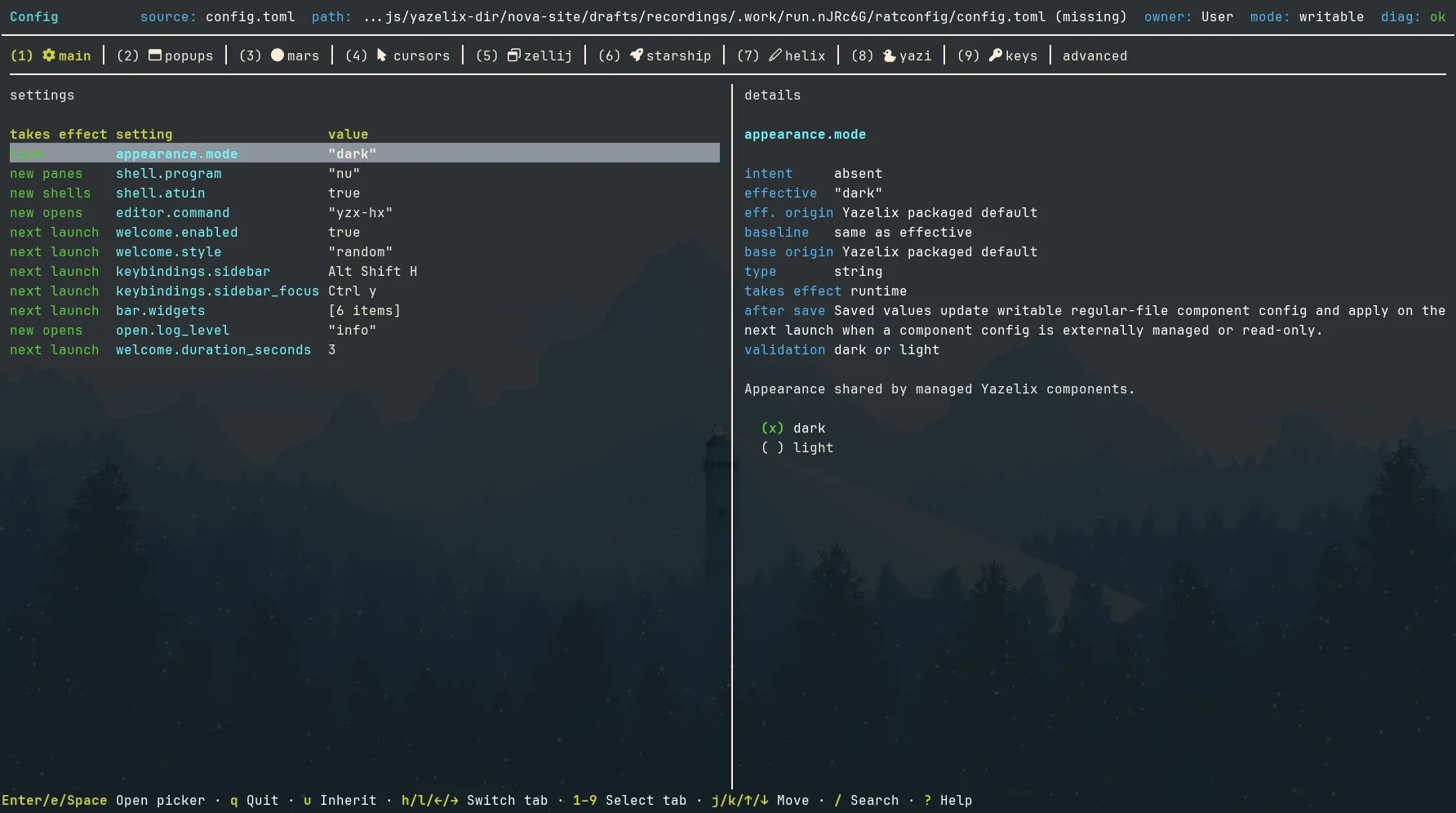
Ratconfig separates inherited values from user intent. See the Ratconfig key contract.
Eight package variants compose three optional capabilities: Mars, managed
Helix, and managed Yazi. A Mars-free package keeps enter; a Helix-free package
uses your configured host editor; a Yazi-free package uses matching host
yazi and ya commands.
The v1 release line
Nova 1.0.0
promoted the dogfooded beta.5 runtime under a stable identity. The release
tag resolves to exact revision
a5cd038a4acf11d24bca0b328043c61fa1712182
and keeps the accepted workspace, session, Yazi, Helix, popup, and channel
contracts.
Nova 1.1.0
adds managed Atuin 18.16.1 history for Nushell, Bash, Zsh, and Fish. Ctrl+r
opens contextual history search while Up-arrow keeps the shell’s native
history. Nova leaves Atuin accounts, sync, daemons, and native configuration
with Atuin. Atuin stores captured commands on the local machine. Review its
privacy filters before capturing commands from sensitive directories. The
1.1.0 tag and Stable branch resolve to exact revision
da60dc7a855048edabe9706207d4f0721ed3c0a8.
Stable is the checked release channel. Main carries accepted updates, and Edge
carries experimental dogfood. Immutable nova-v* tags select an exact release.
Platform boundary
The maintainers dogfood the full Linux path. Nova exposes all eight package variants for Linux and Darwin on x86_64 and aarch64. CI builds the packages and Home Manager activation on a real aarch64-darwin runner. Interactive macOS workflows and the Mars GUI still lack the complete verification that Linux receives. We also have active users dogfooding Nova on macOS every day.
The SSH path starts with yzx enter. Nova guarantees its managed TUI and
configuration there. Your host terminal owns clipboard integration, image
previews, cursor shaders, and desktop notifications.
Start with Stable
Install the checked channel with Nix flakes enabled:
nix profile add --refresh github:Yazelix/nova/stableyzx launchTry the workspace without a profile install:
nix run github:Yazelix/nova/stable -- launchnix run github:Yazelix/nova/stable#yazelix-no-mars -- enterRun yzx tutor begin after launch. The Nova Start guide covers
channels, package choices, sessions, and first steps. The
runtime model maps the owners behind the workspace, and
the customization guide lists the supported
configuration surfaces.
Source record
The site maintainer checked this article on August 19, 2026, against the public
Stable revision
da60dc7a855048edabe9706207d4f0721ed3c0a8,
the Nova architecture,
the installation contract,
the configuration contract,
and the public 1.0.0 and 1.1.0 release records linked above.